Welcome to the World of Artemis Group srl

Years of experience as a system integrator allow us to offer hardware devices and software solutions with the added value of our know-how.
We put passion, commitment, and professionalism into everything we do.

We trust your ideas and support you in bringing them to life.

Here’s how we can help you achieve your goals:

  • We listen to your real needs, but also to your dreams.
  • We design a concrete solution.
  • We carry out the installation.
  • We support you, ALWAYS.
  • We optimize the infrastructure over time.

Easy Access

Access Control

EA Hospitality

Accesso control for camping

Easy B&B

Accesso control for B&B

Easy Time

Time & Attendance System

Easy Clean

Resource Cleaning Management Software

Easy Energy

Energy Consumption Monitoring

Easy App

Mobile Application

Charging Stations

Electric Vehicle/Bike Charging

Supervision

Home automation

Ports and Marinas

Easy Camper

Access Control for Parking Areas

Wine Cellars

Electronic Labeling for Wine Containers


Easy Access

Easy Access is a highly integrated and flexible access control solution, designed to adapt to various environments such as Companies, Hotels, and Campsites. It interfaces with field devices using the KNX protocol and the Wiegand standard, such as RFID readers (cards or wristbands), QR code readers, and keypads. Vehicle license plates are also fully managed through a license plate recognition camera. This makes the solution versatile and suitable for controlling all types of access points.
Easy Access is an innovative and powerful access control system, suitable for both small and large facilities. It is a simple and flexible visitor management system that helps you digitally register and manage company visitors. The solution is suitable for all companies and organizations that require a reliable system to keep control over who is present within a defined perimeter.
The visitor management system is easy to use and can be easily adapted to customer needs. It can be deployed either as a local web server or in the cloud, making it ideal also for unattended facilities. After registration by the security manager, employees will receive an email containing a QR code and a unique, personal PIN. This code allows access to the production area and, if applicable, the opening of other doors that will be equipped over time with dedicated readers.
Qualified suppliers, registered in the same way, will be able to access the production area using their own QR code. In this case, permissions will automatically expire on
31-12 of each year and will remain inactive until the security manager re-enables the supplier. Unqualified visitors, upon arrival, can register through a portal made accessible via a tablet application. After entering their personal details and the reason for the visit, selecting a department or directly a person from the proposed list, and confirming that they have read the privacy and security policies, by pressing the “call” button a call will automatically be forwarded to the mobile device of the previously selected person or department. Communication can then take place directly via a VoIP intercom.
A vehicle license plate can also be associated with an employee and/or supplier in order to allow access to a dedicated parking area, where a license plate recognition camera is installed.

A highly appreciated feature is the ability to notify the visitor already at the time the visit is booked by the operator. This can be done either from the Visitors Reception desk or via the web by authorized operators, and the notification is sent via SMS and/or e-mail.
The customer can fully decide which information is included in the notification. A QR code is also sent, making the check-in process much easier and faster.
Upon arrival, the visitor shows the QR code to a reader (directly from their mobile phone) and is automatically registered, with the optional simultaneous printing of a visitor badge.
The destination department of the visitor receives a notification via SMS and/or e-mail. In this way, visitors who were booked in advance do not need to register manually upon arrival.
If the date and time of arrival match the booking, a call is automatically made to the mobile phone of the host via the VoIP intercom installed next to the entrance gate.

If you already have license plate recognition devices or cameras installed, we can check whether they can be integrated with Easy Access.

  • RFID Reader MIFARE 13.56 MHz or 125 kHz
  • RFID Reader + Keypad
  • RFID Reader + QR Code
  • RFID Reader + QR Code + Keypad
  • Selea Camera
  • Dahua Camera
  • Hikvision Camera

Easy Access for Hospitality

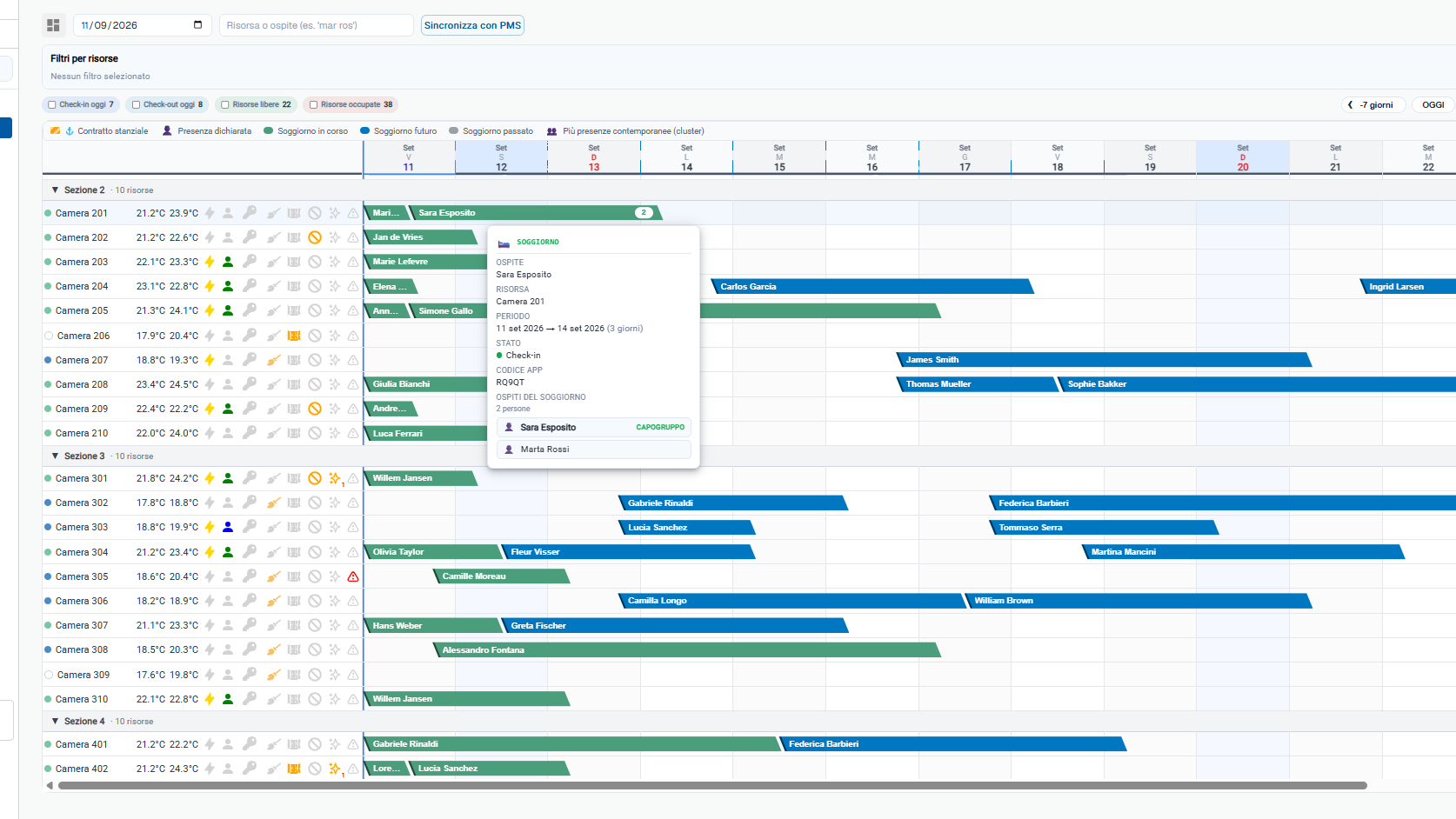
For the hospitality sector, Easy Access offers special features. For example, it can automatically generate access codes or digital keys that can be sent to guests via email or SMS. This mechanism not only enables self check-in, but also reduces the need for physical interaction. Different logics can be created, specific to each resource or to each combination of booking and resource. Through its powerful communication socket with the external world, Easy Access can interface with any software used within the facility. This means that the data entered in the PMS is immediately propagated to the devices, but the guest’s codes will only become active when the booking is actually valid.

Main Features:

  • Reading the following user data from the property management system (PMS) database: User ID, stay, first name, last name, email, mobile phone number, check-in, check-out, assigned room/resource.
  • Group Membership Management
  • Gate Access Management
  • Management of license plates received from the management system and sent to the cameras
  • Access control management through RFID readers assigned to the guest
  • Access control management through a QR code assigned by the application on the mobile phone at the time of the customer’s self-registration Electronic wallet management
  • Sending email / SMS / push notifications to inform the guest that the resource is ready (from the installed maintenance software)
  • Multi-user access via web browser
  • Standalone operation, even without a connected management system
  • Differentiated access point management
  • Access management through license plate recognition
  • Multi-group and multi-time-slot management
  • Quick blocking of lost cards and replacement with a new card
  • Management of access to paid areas with charges applied to the electronic wallet
  • Management of access to paid areas via QR code on the cash register receipt (optional)
  • Export of historical access logs and transaction records

Access control for services such as the gym, spa, swimming pool, or parking area is another key feature. The software can regulate access to these areas based on specific criteria, such as the type of room booked, membership level, or specific time slots. Alternatively, access can be fee-based, with charges applied to an electronic wallet. This enables a smoother and more personalized management of the guest experience, increasing customer satisfaction.

Email/SMS sending: Another important aspect is the software’s ability to automate the sending of communications such as emails or SMS messages. This can be used to confirm bookings, send check-in/check-out reminders, or provide digital access codes. In a corporate environment, this functionality can be used to send security notifications or updates on the status of resources.

Integration: A distinctive feature of Easy Access is its ability to integrate easily with systems already in use within the facility. This means it can be implemented without interrupting or completely replacing existing systems. Our development team is ready to connect your software


Easy B&B

Easy B&B is an innovative and powerful access control system, suitable for both small and large facilities. It can be deployed either as a local web server or in the cloud, making it ideal also for unattended properties. The property manager, using a mobile phone or a PC/MAC (through a standard web browser), enters the personal details of a new guest, defines which access points they will be able to open, and specifies the valid date period:

  • their own room, in the case of hotel facilities, or apartment
  • main entrance door, external gate, garage entrance, SPA, gym, warehouses, technical rooms, laundry, etc.
  • User groups can be created, such as suppliers, cleaning staff, maintenance personnel, etc.
  • The system automatically sends an email and an SMS to the new guest, containing all information related to the reservation, the facility, and instructions for access. It highlights the assigned room and the personal numeric PIN that will be used for the first entry. In the room, the guest will also find the access card properly prepared. The default text of the email and SMS can be customized according to the specific needs of the facility and is dynamically completed with the individual guest’s data.
  • The validity of the PIN and access card is linked to the guest’s check-in and check-out times.
  • The manager can also view the access logs, conveniently even from a remote location.
  • There is also the possibility to open the gates at any time using the dedicated buttons on the related web page.
  • Possibility to connect with cloud booking platforms to automate the entry of guest names and the sending of access credentials.

Devices:
We can provide different types of hardware modules depending on the installation requirements:

  • RFID Reader
  • Keypads with RFID reader
  • QR Code reader + keypad + RFID reader

A highly appreciated solution for opening access points is the use, on each door, of a simple plate with a QR code that is read by an application installed on the guest’s mobile phone.
This solution does not require any infrastructure outside the doors, which makes it particularly interesting for common areas in apartment buildings.


Easy Time

Easy Time is a modern and versatile software for employee time and attendance tracking. It supports several clock-in methods:
Card on a Device Installed in the Company: This method involves the use of a physical device, such as a badge reader, installed within the company premises. Employees clock in and out by placing their card near the device. This method is effective in ensuring that time tracking takes place only inside the office.
Card Read on a Turnstile: Similar to the previous method, but with the addition of a turnstile that opens only after the card has been correctly read. This system is often used in large companies or in facilities that require a higher level of security.
Web Page: This method allows employees to clock in through a dedicated web page, accessible from both computers and mobile devices. It is a flexible solution that also enables remote clock-ins, ideal for smart working or business trips.
Via Mobile Phone: The solution also includes the possibility of using a mobile device, allowing employees to clock in directly from their smartphone. This method is extremely convenient and suitable for companies with a modern and dynamic approach. The solution may require the use of GPS to verify the employee’s location at the time of clock-in, ensuring proper management even on remote construction sites. For this solution, no application is installed; instead, a personal URL is provided and the connection is closed immediately after the clock-in is completed, ensuring full user privacy.

Easy Time is a solution that primarily works in the cloud or, upon request, can be installed on the customer’s servers. It is based on a Linux kernel and allows multiple locations (for example, stores) and their assigned employees to be managed from the same dashboard. The HR department, in complete autonomy, can modify work locations and therefore assign employees accordingly.


Easy Clean

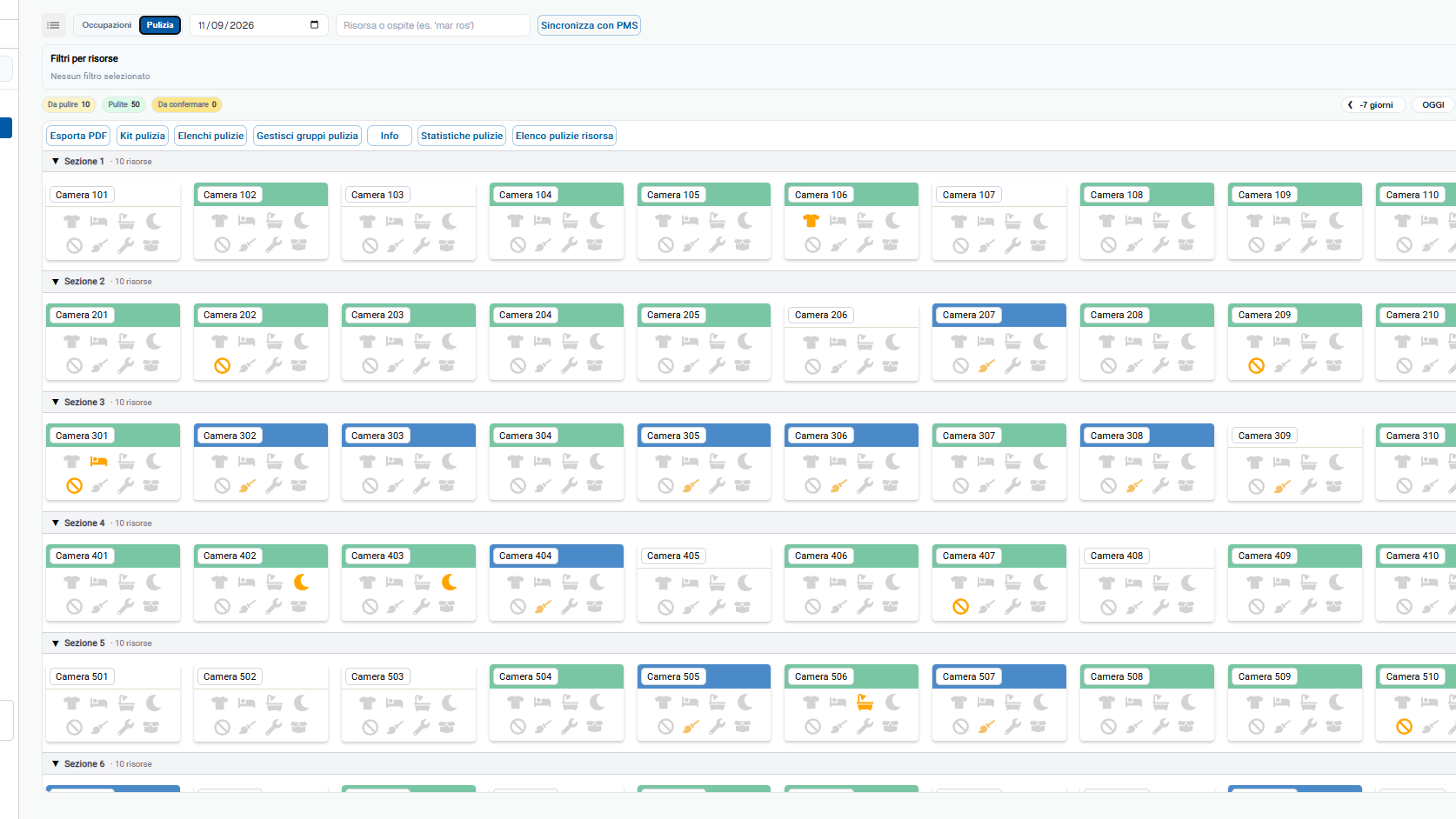
Easy Cleaning is designed to meet the needs of managers in the hospitality industry who want to communicate effectively with cleaning and maintenance teams. The operators themselves also have the possibility to report maintenance issues or the status of units that need to be checked.
It allows cleaning staff to be notified about which resources require intervention, such as: full cleaning, bathroom cleaning, linen change, and more.
In this way, it is possible to quickly monitor the status of the resources and notify the guest via SMS or push notification that their unit has been cleaned and is ready to be “occupied.”
It is also used to monitor the actual work carried out by the cleaning staff.
Resource status: Reception of check-in and check-out from the management system or manually from the portal, with consequent update of the resource status.
In case of check-in, the resource can be marked as “to be checked.”
In case of check-out, the resource can be marked as “to be cleaned,” with or without priority.
If a stay lasts more than a certain number of days, it is possible to schedule linen changes, towel replacement, minibar checks, with variable periodic cycles.
The resource can also be set to one of the previously described states manually by an authorized account.
When the cleaning staff member logs into the app, they find the resources assigned to them that need to be worked on. Once a resource is selected, a list of all the assigned cleaning tasks is displayed. When the cleaning staff member has finished cleaning the resource, they press a button in the app to indicate that the resource is clean, and a notification is sent to the management system or to the portal. A notification can then be sent to the guest informing them that the resource is ready for use, either via SMS or through the facility’s dedicated app. Both the cleaning staff and the guest staying in a specific resource can send reports (for example: broken mirror, missing bed sheets, etc.).

Division into resource categories: different resources may require different types of cleaning.
Campsite sections or hotel floors: each cleaning staff member can be assigned to a specific area of the campsite or to a specific floor of the hotel.
Resource statuses: Habitable (ready for use) – To be refreshed – To be cleaned – Not habitable
Integrable with the management system already in use at the facility.


Easy Energy

Artemis Group is aware that every company can increase its productivity by consuming less and saving up to 30% on electrical energy. This goal can be achieved through:
Accurate allocation of energy costs to individual resources
Identification of energy losses
Proactive verification of asset maintenance
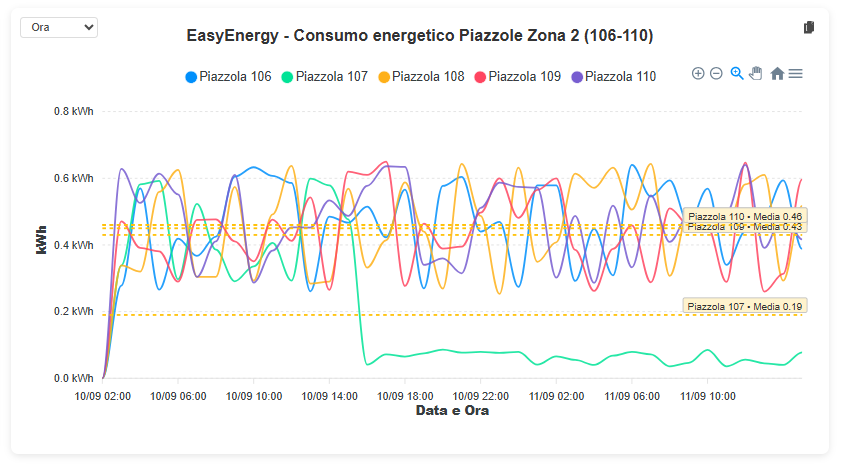
Easy Energy allows companies to monitor and analyze their energy consumption in a precise and contextualized way. It creates a data baseline to evaluate the impact that future projects and investments will have in reducing consumption and increasing efficiency. It interfaces with devices using the KNX and Modbus protocols, as well as wireless technologies such as LoRaWAN.

La soluzione di Energy Management nel caso di un Campeggio consente di:

  • Manually and/or automatically activate / deactivate remotely, via the management system (check-in/check-out), the energy supply for each pitch / cottage / room.
  • Measure the energy consumed by each outlet of the service column through meters that can also be MID-certified.
  • Through the management system, at check-in the meter value is read and stored, and at check-out the register value is read again. The difference represents the energy consumed.

Thermoregulation: ability to manage the thermoregulation of the entire facility by controlling the room thermostats and air conditioners.
Each °C less = 7% savings

Example for an Open Air facility: The solution is developed by integrating the Energy Metering Software module into the Access Control Gateway. Actuators with 16 A direct-connection energy meters, using a standard communication protocol, are installed inside the distribution panels of the power columns. Through these devices, historical data of the energy used by each column is collected. This makes it possible to understand how energy is consumed based on months, days, and time slots. For this solution, the communication bus must be physically routed from one column to another, and DIN-rail modules must be installed inside each one. Energy metering modules are also installed in main panels and sub-panels, in order to analyze the consumption of the facility’s macro areas. In this case, three-phase devices with current transformers (CTs) suitable for the involved power levels are used. Using a standard protocol has the advantage of not being tied to a specific product or brand, ensuring that spare parts will always be available in case of failures. In the future, the same bus and the TCP/IP network can be used to expand the system, bringing technical alarms to the same server, such as: boiler lockout notifications, maximum or minimum well level alerts, power outages in specific panels, or exceeding predefined temperature thresholds.


Easy App

Easy App is a customizable application with your logo and branding, publishable on both the Android and Apple app stores. Your app not only simplifies the management of daily activities for campsite guests, but also offers a more technological and modern experience, improving interaction with your facilities and the services you provide.

Self-registration and Verification: Users can register independently within the app. Identity verification is carried out via SMS or email, ensuring both security and ease of use. The app is automatically linked to the stay registered in the management system.

Data Recovery: If needed, users can recover their login details via SMS or email.

Message Center and Reception Notifications: The application sends push notifications and includes a message center where guests can receive communications from the campsite reception, such as alerts, special events, or useful information.

Connection to Electric Vehicle Charging Stations:
Through the app, users can connect to electric vehicle charging stations compatible with the OCPP protocol. This allows them to purchase charging services on a pay-per-use basis, directly from your application.

Electronic Wallet Top-Up: Users can recharge their electronic wallet using a credit card or PayPal. This balance can then be used for various services within the campsite.

Features: The mobile phone can be used to access gates or control bungalow home automation systems.

Customizable front-end: the functions of the application can be modified completely independently by creating groups and buttons where products and/or services can be inserted using preconfigured templates.

Guest reports: In case of need, users can send a communication to report a problem, request medical assistance, or report a fire. The phone is geolocated and, at the reception, in addition to activating an audio-visual alert, the location from which the request was sent is displayed.

Service and rental bookings: through their mobile phone, guests can rent bicycles, pedal boats, or other available services. The operator receives real-time notifications of the bookings.

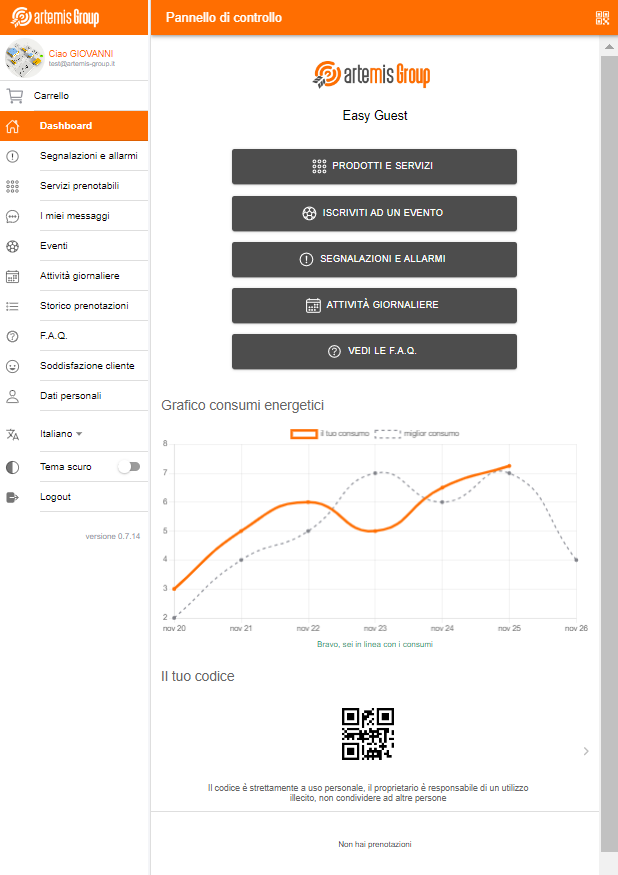
Stay information: viewing of data related to the stay, such as dates, assigned resource, and energy consumption, with charts comparing usage to the most energy-efficient benchmark.

Wi-Fi: password for personalized Wi-Fi access, with the possibility to purchase a profile with extended performance.

Cloud Server SaaS Software and Dashboard supporting the App
Administration: App administration portal where it is possible to freely customize the available services and their delivery methods.
Push Notifications: Sending broadcast push notifications or notifications to individual guests. It is possible to select guest categories to whom notifications are sent, for example all guests with a valid check-in to promote restaurant or beach bar offers.
Discount Vouchers: Creation of vouchers for the purchase of services usable by the guest through the app (percentage or fixed value).
Facility Admin Portal: Mini website. At first launch, the application works as a mini site with photo gallery, facility description, facility name, and price list.
Internal Events: Entry by the Reception of all weekly or bi-weekly events, divided into categories: Adults – Children – Four-legged friends (pets).
Users: Manual creation of users (guests) or repositories where all users created by the management system in use at the facility or through self-registration are collected.
Reports: List of reports received from guests (fire alarm – SOS – faults/breakdowns).
External Home Automation: List of buttons made available to registered and active users.
Credentials Management and List: Credentials of staff members for each service who will receive customer orders, alarm notifications, or maintenance requests.
Message Center: Push notifications are sent from here. Messages can be targeted by category: all present guests, all active guests, only those who are about to check out, or single users.
Services: Management and list of payable, bookable services and products • Price definition for each product/service offered for sale • Structure of all services with their respective sellable time slots.
EV Electric Vehicles: Portal for managing electric vehicle charging stations, including kW pricing.

Management of permanent guests: through the app, users classified as “permanent residents” can declare the presence of family members or visitors, indicating the expected period of stay. The list is exported to an XLS file via the access control portal, so it can be used to complete the mandatory communication to the Police authorities (PS). (It can be connected to the automatic submission performed by the management system.)


EV Charging Stations

Charging station, equipped with a Type 2 connector and a 5 or 7 meter cable, allows you to use the excess energy produced by a photovoltaic system to charge your car for free, or, using the Night mode, to charge only during the hours when electricity costs less. Equipped with an RFID reader to prevent unauthorized access, it can be managed via the Easy Guest App thanks to Ethernet and WiFi connectivity.

Hospitality: An innovative service for visitors, guests, and customers. Depending on the installation location, the charging station can be installed with a fixed cable or with a socket. The Easy Guest application provides detailed reports per charger or per individual charging session started from the guest’s app, which can be associated with each room or resource within the facility.

Condominiums: Each resident is provided with a personalized card to charge their own EV. The building administrator has access to a web interface to charge each resident for the amounts related to their monthly charging sessions.

Features:
IP65 protection rating. It is the perfect solution for outdoor installations exposed to weather conditions.
Load balancing and use of excess solar energy, without the need for additional accessories.
Supplied cable: 5/7 meters with Type 2 connector, or Type 2S socket with safety shutter.
Smart management: through Easy Guest, customers use your facility’s application to pay for and charge their car, while from the portal you have access to all statistics and information. You can create percentage or fixed-value discount coupons to offer to your customers or employees.
Power: single-phase up to 7 kW — three-phase up to 22 kW


Supervision

Integrated Supervision of Technology in Large Facilities:
A single system for intelligent management of the facility and for reducing energy consumption. All the different subsystems within the structure are integrated thanks to the use of the proposed multi-protocol technology. A powerful engine makes all systems integrable over time and able to communicate with users.
The solution allows the creation and integration of multiple functionalities, ensuring high-level services and organizational standards capable of meeting any type of requirement.

Control and alerts in real time for all types of faults and/or alarms, with no limits on the number of alarms that can be implemented.
Sending customizable notifications via email and/or SMS, addressed only to the relevant people (Management, internal/external maintenance staff, etc.).
Real-time monitoring of active network devices, Wi-Fi radios, and the functionality of the internal network, with alerts before the entire infrastructure degrades.
Monitoring of devices dedicated to video surveillance.
Lighting control with multiple logics and timers to increase energy efficiency.
On/Off/Fault monitoring of boilers, HVAC systems, and refrigerators.
Monitoring of thermal trips in electrical panels.
Monitoring of water pump lockouts.
Swimming pool control.

EXPANDABLE – UPGRADEABLE – CUSTOMIZABLE – INTEGRABLE

Mobile Homes, Hotel-style installation:

  • Thermoregulation control
  • Access control in individual housing units
  • Guest presence detection inside the unit
  • Window contact for air conditioner deactivation
  • Automatic activation of the burglar alarm when guests leave
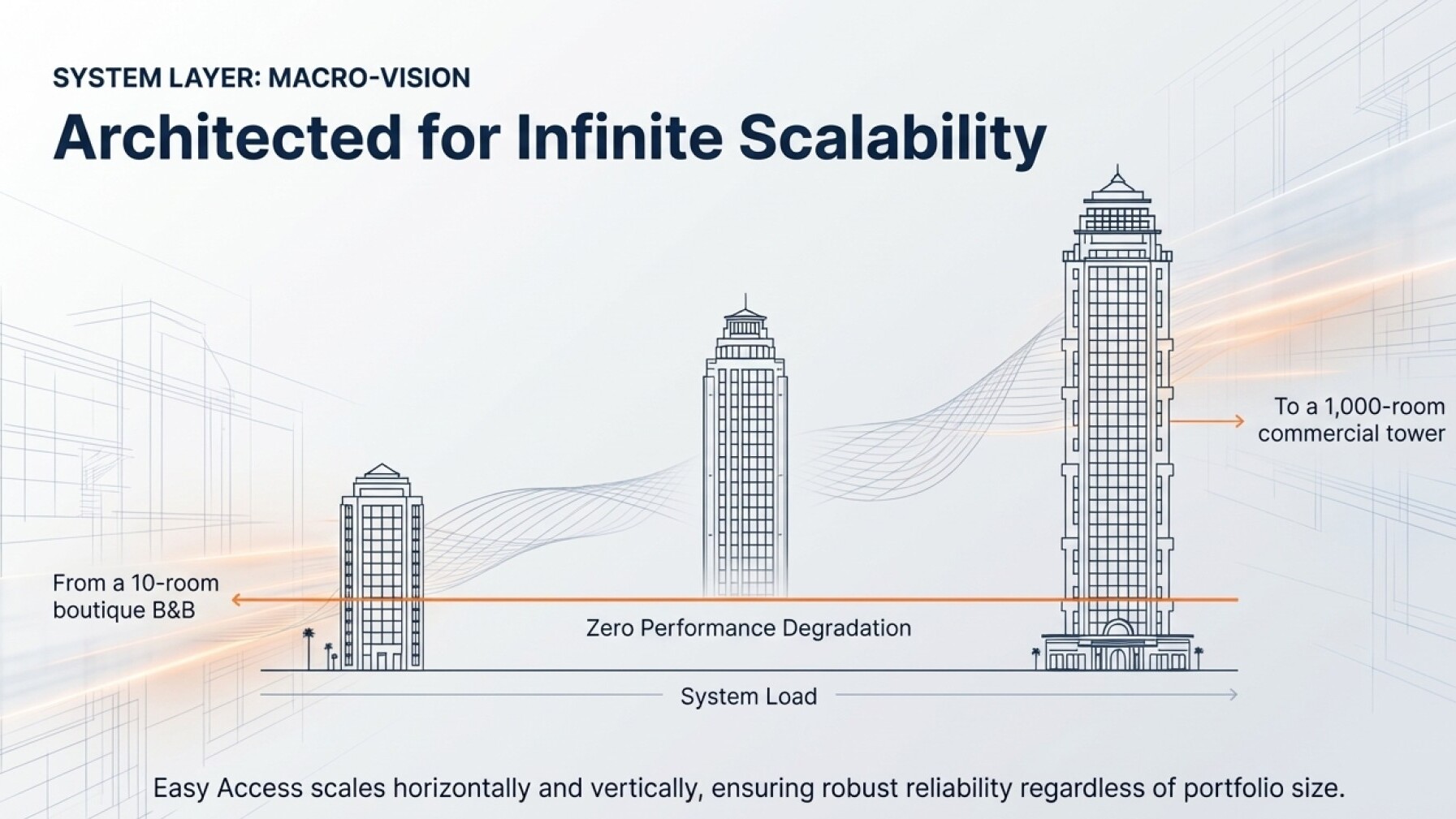
  • Flexibility and scalability to adapt to all the needs of Management and operational staff.

It is possible to carry out the installation in progressive phases, by sectors and/or by uniform groups of technologies to be managed, in order to spread the investment over time.


Home automation

Come operiamo:
Analisi Iniziale e Consulenza: I nostri esperti di domotica iniziano con un’analisi delle esigenze specifiche dell’hotel o del campeggio. Questo include la valutazione dell’infrastruttura esistente, la comprensione delle necessità di risparmio energetico e l’identificazione delle aree che possono trarre il massimo beneficio dall’automazione.
Progettazione del Sistema: Dopo l’analisi iniziale, viene progettato un sistema personalizzato. Questo può includere il controllo automatico dell’illuminazione, la regolazione della temperatura, la gestione dei sistemi di sicurezza e la centralizzazione del controllo di vari dispositivi elettrici. Il sistema KNX permette di integrare tutti questi elementi in una rete unificata.
Selezione dei Componenti: I componenti vengono selezionati dal catalogo KNX in base ai risultati desiderati, come sensori di movimento, termostati intelligenti, sistemi di controllo dell’illuminazione e altro ancora. Di solito vengono scelti dispositivi di diversi produttori.
Installazione e Configurazione: I nostri tecnici procedono con l’installazione fisica dei dispositivi e la loro configurazione. Durante questa fase viene data particolare attenzione alla configurazione della rete KNX per garantire una comunicazione fluida tra tutti i dispositivi.
Programmazione e Personalizzazione: Il sistema viene programmato per rispondere automaticamente a determinati scenari, come spegnere le luci nelle aree non occupate o regolare la temperatura in base all’orario o all’occupazione della stanza. In questa fase viene anche effettuato il collegamento ai diversi database dei gestionali in uso.
Formazione del Personale e Supporto: Il personale dell’hotel o del campeggio viene formato sull’utilizzo del sistema. Vengono fornite istruzioni dettagliate per garantire una gestione efficace. Inoltre, viene offerto un supporto continuo per eventuali domande o modifiche.

NON VI LASCIAMO MAI SOLI:
Monitoraggio e Manutenzione: Dopo l’installazione, il sistema viene monitorato da remoto per garantirne il corretto funzionamento. Vengono effettuate manutenzioni regolari per assicurare prestazioni ottimali e per apportare eventuali miglioramenti.

The introduction of Building Automation not only improves energy efficiency and reduces operating costs for hotels and campsites, but also increases comfort and safety for guests.

The Artemis Group team has many years of experience in the configuration and programming of KNX systems and particularly complex PLC-based automation systems. We specialize in reverse engineering of existing installations.


Marina Connect

Marina Connect is an advanced mobile application designed to simplify management and enhance the experience of boat owners within your marina. It offers a complete range of features to access and manage services, make reservations, monitor energy consumption, and interact with marina staff.
Main Features:

Quick Access to Marina Services:
View available spaces for launching and hauling.
Book launching, hauling, and technical services provided by mechanics.

Energy Management:
Remote activation/deactivation of electricity and water supply for each berth.
Real-time monitoring of energy consumption.
Automatic calculation of the cost of consumed energy and water.

Accounting and Payments:
View the balance of the electronic wallet.
Secure payment of services and expenses through the app.
Transaction history and available receipts.

Efficient Communication:
Message center for important notifications.
Alerts for payment deadlines, special events, and marina updates.
Two-way messaging between boat owners and the marina office.

Bookings and Additional Services:
Reservation of tables at the marina restaurant.
Ordering and booking breakfast at the bar.
Quick access to additional services offered by the marina.

Benefits for Boat Owners:
Boat owners have full control over the management of their berths and services.


Easy Camper – Rest Areas

Easy Camper is an innovative solution that combines hardware and software to automatically and intelligently manage camper parking areas. This system allows users to book a space through an application downloadable from the app stores. Once the available pitch for the desired period has been selected, the user can enter the required information, including the vehicle license plate, and proceed with payment. The reservation guarantees access to the parking area, with the possibility to control the amount of water that can be supplied. If the predefined limit is exceeded, users can independently purchase additional water supply. The application can also integrate additional services available in the parking area, making them easily accessible to users through items that can be purchased directly from their mobile phone. Any communication can be carried out through written reports, as well as via VoIP calls. This solution represents a significant step forward in the sector of mobile tourism, offering convenience, efficiency, and an improved user experience. We use products from leading brands, easily available from electrical material wholesalers, so our partners can always find spare parts locally.

Possibility of integration on existing service columns; the hardware and software solutions can be configured according to specific needs.

General Features of the Service Columns:
Operating ambient temperature: -25°C to +40°C
Material: Thermoplastic
Residual current circuit breakers (RCD) Idn = 30 mA
Circuit breakers from 6 A to 16 A
Protection rating: IP56
Impact resistance: IK10
Insulation class: Class II (double insulation)
MID-certified meters


Help Desk

Artemis Group srl is committed to providing a complete, efficient, and state-of-the-art after-sales service, aimed at meeting customer needs in a timely and professional manner.
Availability: The help desk is available 7 days a week during office hours. This extended availability allows partners to receive assistance when they need it most, ensuring continuous support.
Software and Application Support: We provide a team of highly qualified and continuously trained technicians to offer support for both software and application-related issues. This ensures that any customer problem or requirement can be handled effectively.
Advanced Technologies for Remote Assistance: The company uses cutting-edge technologies for remote support. This allows rapid and effective intervention on any issue, minimizing downtime and improving customers’ operational efficiency.
Data Privacy and Security: A fundamental aspect of the service is the respect for customer data privacy and security, an increasingly critical element in the digital era.
Maintenance: Artemis Group carries out the following services on behalf of the client:
Corrective maintenance: restoration of the basic functionality of the system.
Adaptive maintenance: continuous remote monitoring of system performance, evaluation of its effectiveness and load peaks, and proposal of any actions and/or implementations needed to prevent malfunctions.

We provide technical support to our Partners, with particular attention to business continuity.
Beyond installation, we stay close to our Partners by offering assistance and maintenance for all the solutions we deliver.
Our goal is to ensure that hotel and campsite operations run without interruption, thus providing a smooth and safe experience for both guests and staff.


Etichette.ID

Etichette.ID is a QR Code or digital label system that automates the management and updating of all data related to the contents of tanks, vats, and barrels throughout the entire winery. It replaces paper sheets or chalkboards.

It proves to be a valuable support for:
Optimizing time, because from a PC a single operator (the oenologist) can enter the processing operations on the containers and/or the wine transfers, and this information is sent to the cellar staff and immediately associated with the QR codes.

Simplicity:
The information to be displayed can be uploaded from a simple Excel file, from applications already in use, or by using the intuitive Etichette.ID software interface, which also allows data and process history tracking.

Avoiding errors:
The information to be displayed can be connected to different management systems with multiple data sources such as SQL Server, MySQL, Oracle, and ODBC.

Digital or QR code labels represent an easily updatable and expandable system that grows and flexibly follows the company’s choices and needs.

It is therefore always possible to:

  • increase the number of labels connected to the system simply by printing the QR code;
  • modify the entered data and the brand;
  • expand the software features;
  • simple installation, since it is enough to place the QR code on the wine vessel
  • quick commissioning, even by non-expert operators.

Automatic balancing and reconciliation between physical stock and management system data
For this specific feature, please request a demo.

How it works:
Artemis Group offers its Partners the complete dedicated software solution “etichette.ID”, which can be directly interfaced with the company’s management system and exchange data in the most common available formats.
Through the “etichette.ID” software (CSV file, XLS, or generated by other company software), the winemaker is able to enter the operations or processes to be carried out on the wine contained in a specific tank (or vat or barrel).
It is possible to set or modify the following data:

  • Type of wine contained
  • Tank reference
  • Quantity contained
  • Tank/barrel capacity (set during the system setup phase)
  • Unique reference code
  • Operations to be carried out by the cellar master

The oenologist directly associates the operations to be carried out on each tank, and they are automatically displayed in real time on the cellar worker’s handheld application. Through the QR code, cellar staff can view the contents of the tank and the wine processing tasks communicated by the oenologist via the “Etichette.ID” software. Once the operation has been completed, the operator, again using their mobile phone, marks the task as done; the digital label is then automatically updated. By accessing the software, the oenologist can verify that the operation has been carried out, and the system records which cellar worker performed it. The software also allows consultation of the history of all operations performed, indicating the type of process, date and time, and the cellar worker involved. Artemis Group provides the system with a gateway that allows remote access via a dedicated VPN, thus offering a remote assistance service to the customer. The software can operate both in the cloud and on local installations.


Services App

We develop a mobile application that is published on the Android and iOS app stores with the name and logo of the facility. This solution can be connected to the existing management and access control system, enabling bidirectional communication with your guests.
Application developed for iOS and Android.

  • Publication on the app stores with the facility’s logo and name
  • Customer self-registration with verification via SMS / email
  • Data recovery via SMS / email
  • Wallet top-up via credit card / PayPal
  • Independent purchase of the following services, which can be freely customized (examples):
  • Sailing and windsurf school
  • Rental of bicycles, pedal boats, and canoes
  • Tennis court and five-a-side football field booking
  • Push or SMS notifications to your customers, with the ability to filter by: guests currently on site, future guests, or all registered customers.
  • Bicycle rental booking with minimum time slots of 1 hour or half a day
  • Barbecue area booking with half-day time slots
  • SUP / kayak rental booking with 30-minute time slots
  • Booking of hiking or mountain bike excursions
  • Events that can be independently customized, for example: five-a-side football tournaments, regattas
  • Activation of washing machines or dryers via the app with charging of the preset cost
  • Payment of the stay via credit card / PayPal
  • Independent purchase of services and merchandising by the customer
  • Purchase of pizzas / drinks with pickup at the restaurant or delivery to the assigned accommodation unit
  • Access to pay-per-use services, such as washing machines / jacuzzi
  • FAQ
  • Guest reporting, for example: “the air conditioner in the unit is not working.”
  • Guest SOS alarm notification
  • Guest fire alarm notification (not certifiable as a fire protection system)
  • Daily activities within the facility
  • Customer satisfaction survey (optional connection via external link if another solution is already in place)
  • Independent purchase of daily access to the facility by external guests, with automatic control at the entrance turnstile

Cloud Server and Dashboard to support the App

  • App administration portal where it is possible to freely customize the available services and their respective delivery methods.
  • Sending push notifications in broadcast mode or to individual guests
  • Creation of vouchers for purchasing services that can be used by the customer within the app
  • Maintenance module for managing accommodation unit cleaning
  • Facility Admin Portal
  • Mini website: at the first launch, the application works as a mini website:
  • Photo gallery – Facility description – Facility name – Facility price list – Feedback form – Frequently Asked Questions (FAQ)
  • Internal Events: entry by the Reception of all weekly or biweekly events, divided into: Adults – Children – Four-legged friends (pets).
  • Users: manual creation of users (guests) or a repository where all users created through the Cloud Village management system or via self-registration are stored.
  • Reports: list of reports received from guests (fire alarm – SOS – malfunctions).
  • External Home Automation – List of buttons made available to registered and active users
  • Management and list of staff credentials for each service, who will receive customer orders or notifications for alarms, maintenance, and cleaning.
  • Message Center – From here, messages are sent and divided into categories: all guests currently on site, all active guests, only those who are about to check out, and individual users.
  • Activation of additional languages
  • Definition of which staff members can view the list of reports and mark issues as resolved.
  • Management and list of bookable paid services and products
  • Definition of prices for each product / service offered for sale
  • Structure of all services with their respective sellable time slots
  • Images
  • Bookings
  • Messages and promotions
  • Definition of employees who can access the corresponding booking portal

Electronic wallet

The electronic wallet software for campsites is used to manage the payment system within the campsite. Users can load money into their account via credit card, PayPal, or directly at the reception, and then use their electronic wallet to purchase goods and services within the campsite.
The application is integrated into the campsite’s Services App and, on the user side, includes the following features:
Account Management: the software allows users to create an account, load funds, and check their available balance.
Transaction Management: the software records all transactions made with the electronic wallet and provides a history of users’ expenses.
Security: the software employs various security measures, such as multi-factor authentication, to protect user accounts and personal data.
Electronic Wallet Software Module: includes software for reception and cash registers.

  • Wallet top-up and deduction, identification and payment via USB RFID reader at the cash register
  • Verification of individual user and daily transactions
  • *Some activities are allowed only at Reception.
  • LOGIN/LOGOUT: entry of the operator who will carry out transactions via RFID reading
  • CARD PAYMENTS: in this section, it is possible to charge an amount to a previously selected card, and here you can also view the total balance available on the card.
  • CARD E/C: in this section, it is possible to view a list of all card transactions, divided by day, transaction description (where possible with product details), e.g., garden bar, transaction amount. Recharges and refunds are also listed here.
  • CARD TOP-UP: operation to recharge the card via cash deposit at Reception. It is also possible to top up the wallet through the App and pay via PayPal or credit card. If the Easy Coin Totem is available, users can also top up independently using cash or debit card.
  • CARD ACTIVATION/DEACTIVATION: used to associate a card with a guest; it allows deactivating the guest’s card and associating a new one.
  • CARD BLOCK: suspends the electronic wallet activity of the card until further input. This operation can be activated directly by the guest through the App, and the use of the QR code can also be suspended.
  • CARD REFUND: allows closing the wallet account and returning any remaining balance, if present.
  • CASH INFLOW: displays all positive cash movements for the register, divided by date, customer, operator, and amount.
  • CASH OUTFLOW: displays all negative cash movements for the register, divided by date, customer, operator, and amount (cash returns or reversal of charges).

Easy Clean

Easy Cleaning – Maintenance and Cleaning Software Module

  • Easy Cleaning is a module that can be activated within the App and is used to manage cleaning operations within a facility. It allows notifying cleaning staff about which units require specific tasks: full cleaning, bathroom cleaning, linen change, and more.
  • Quickly check the status of units and notify the guest that their unit has been cleaned and is ready for use.
  • Monitor the actual work performed by the cleaning staff.
  • Unit status:
  • Reception of check-ins and check-outs from Cloud Village or manually via the portal, and updating the unit status.
  • In case of check-in, it is possible to mark the unit as requiring inspection.
  • In case of check-out, it is possible to mark the unit as needing cleaning.
  • If a stay lasts more than a certain number of days, it is possible to schedule linen/towel changes and minibar checks (if available) with cycles at variable intervals.
  • The unit can also be manually set to any of the previously described states by an authorized account.
  • Assignment of units to be “worked on” and list of tasks for each staff member.
  • Notification of cleaned unit and sending the update to Cloud Village and the web portal.
  • Sending a notification to the guest that the unit is ready for use, via SMS or through the app.
  • Both the housekeeping staff and the guest staying in a unit can submit reports (e.g., broken mirror, missing sheets…).
  • Division of units into categories within the campsite.
  • Campsite sections: cleaning staff can be assigned to different sections of the campsite.
  • Unit states:
  • Habitable (ready for use)
  • To be refreshed
  • To be cleaned
  • Uninhabitable

Easy Time

Management of employee check-ins and check-outs in three functional modes: Web: access via an electronic device using user credentials; Digital with RFID card: via a device on-site physically connected to the data network; App: from any iOS or Android mobile device.

Through the app, employees can clock in and out in just a few seconds using their smartphone, also specifying the site or project they are working on. This solution is ideal for those working remotely, on business trips, or at client locations. Additionally, the app can be used even without an internet connection, with data automatically synced once the connection is restored.

With the app, employees can view the history of their absences and submit requests for leave or time off. Additionally, if an employee forgets to clock in or out with their card, they can submit a missing clocking request to the HR office, which receives the request, can manage it, and communicate with the employee.

The Easy Time solution for attendance tracking is designed to be used independently by employees, including via the web, and offers an intuitive interface that allows each employee to easily access all the information they need.

Example of display on a mobile device:

Once logged into the web page, the employee must access the reserved area by entering their login credentials. The user can then select the check-in or check-out option, according to their needs. At this point, the application prompts the employee to confirm by pressing a button again, which records their attendance.

Easy Time also offers additional features, such as the ability to request leave or time off directly through the mobile application. In this case, the employee can select the leave or time-off request option, specifying the requested period and the reason. If the employee forgets to clock in or out, they can propose an entry or exit time through the portal. The administration office then receives a notification of the request, which must be approved or rejected. Using a mobile device, employees can manage check-ins and check-outs even at work locations far from the company headquarters. During clocking, GPS activation is requested to geolocate the location. This solution ensures maximum employee privacy, as no additional application installation is required.


Easy B&B

Easy B&B is an innovative and powerful access control system, suitable for both small and large facilities. It is available as a local web server or cloud-based solution, making it ideal even for unattended properties.

The facility manager, using a mobile device or a PC/MAC (with a standard web browser), enters the personal details of a new guest, sets which access points they can open, and defines the date range during which access is allowed:

  • Their room, in the case of hotels, or their apartment.
  • Main entrance door, external gate, garage door, spa, gym, storage rooms, technical rooms, laundry, etc.
  • User groups can be created, such as suppliers, cleaning staff, maintenance personnel, etc.
  • The system automatically sends an email and an SMS to the new guest, containing all information related to the booking, the facility, and instructions for access. It highlights the assigned room and the personal numeric PIN to be used for the first entry. In the room, the guest will also find the appropriately prepared key card. The default text of the email and SMS can be customized according to the specific needs of the facility and is automatically completed with the individual guest’s details each time.
  • The validity of the PIN and key card is tied to the guest’s check-in and check-out dates.
  • The manager can also view the access logs, conveniently even from a remote location.
  • There is also the option to open the access points at any time using the dedicated buttons on the corresponding web page.
  • Possibility to connect with cloud-based booking platforms (quotation available upon request).

A special group will be created for managing individual clinics, allowing medical staff access to be regulated according to time slots.

  • The system programs the PINs of authorized guests into the keypads, exclusively for the access points each guest is allowed to open and only for the valid period. This way, in addition to using their key card, users can enter their personal code on a physical keypad.
  • Additionally, if the electric locks are equipped with a mechanical key, there is an extra option for access.


Energy Management for Cabins/Charging Stations

Energy management software is a type of software used to monitor, control, and optimize the energy consumption within a facility. The solution can help reduce energy costs by tracking energy usage and identifying opportunities for savings. Additionally, it can help optimize energy utilization and reduce environmental impact by planning energy use more efficiently. It is an energy management software that can be accessed through major web browsers. It offers the ability to integrate devices that use the KONNEX or Modbus protocols for communication and can be easily expanded and scaled to meet future user needs. Furthermore, the software provides the option to manage alarms with notifications via email or Telegram.

Energy management software includes a range of tools and features for energy monitoring, such as energy sensors and metering devices, dashboards for real-time energy data visualization, and reports for long-term data analysis. It can also include energy automation and control features, such as controlling lighting and heating based on building needs. The solution allows users to view instantaneous energy values and charts to monitor energy consumption, including minimum, maximum, and average values.


Easy Coin

Easy Coin is a payment terminal placed at the Reception for purchasing services using credit cards, debit cards, or cash with change-giving functionality. It features an integrated 4G router for remote management and support, independent of the establishment’s network. Payment devices and electronic cards are removable without tools for quick maintenance. The large display ensures better communication with customers. A backup battery allows ongoing transactions to be completed in the event of a power outage.